Prompt Builder
Prompt Builder lets you create, refine, and manage AI prompts effortlessly for optimal results across all major AI models.
Visit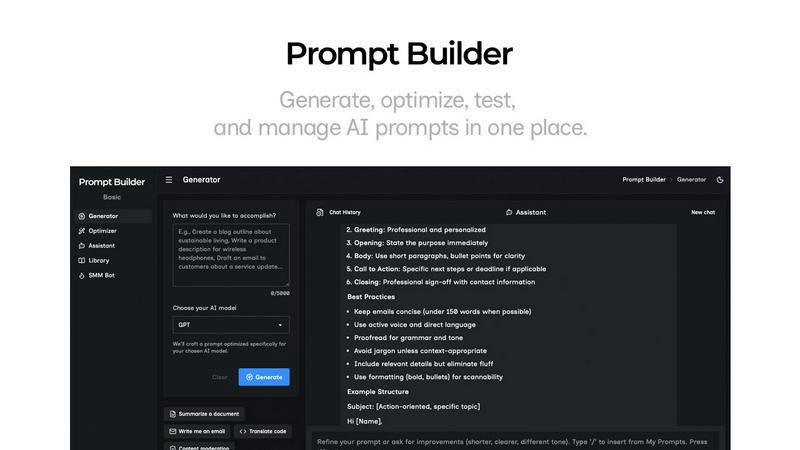
About Prompt Builder
Prompt Builder is an innovative workspace designed specifically for prompt engineering, making it easier for users to write, test, and save prompts tailored for various AI models. It acts as a bridge between your ideas and the AI tools you utilize, allowing you to start with a rough draft and refine it through an interactive chat interface. This feature-rich platform supports a wide range of AI models, including GPT, Claude, Gemini, Llama, Mistral, DeepSeek, Grok, and Perplexity, ensuring versatility for users across different applications. With functions to generate, optimize, and organize prompts, Prompt Builder streamlines the process of crafting effective prompts, reducing the time spent on revisions and iterations. Its library feature lets users save and access reusable prompts and templates from the community, empowering teams to collaborate effectively and leverage collective insights. Whether you are a developer, content creator, or product manager, Prompt Builder is designed to enhance your productivity by turning ideas into actionable prompts in just seconds.
Features of Prompt Builder
Prompt Generator
The Prompt Generator allows users to quickly transform their ideas into optimized prompts for their chosen AI models. By simply describing an idea and selecting the model, users receive a professional-grade prompt that can be further refined through a chat interface, ensuring high-quality outputs tailored to specific needs.
Chat Refinement
Within the built-in chat workspace, users can refine their prompts in real-time, making it easy to iterate and improve their initial drafts. This feature supports a separate assistant model to guide users through the refinement process, enabling faster adjustments and enhancements.
Prompt Optimizer
The Prompt Optimizer function helps elevate existing prompts by providing structured improvements in areas such as clarity, constraints, and output format. Users can easily paste a prompt or select one from their library, and the Optimizer delivers a clearer and more effective version, complete with an auto-saved history of optimizations.
Prompt Library
The Prompt Library serves as a centralized repository for saving, organizing, and reusing prompts across various projects and teams. Users can search and filter prompts by category and model, pinning their favorites for quick access, thereby enhancing collaborative efforts and knowledge sharing.
Use Cases of Prompt Builder
Rapid Content Creation
Content creators can utilize Prompt Builder to generate engaging articles, social media posts, and marketing materials quickly. By refining prompts tailored to different platforms, users can ensure their content resonates with specific audiences, improving engagement rates.
Software Development
Developers can benefit from Prompt Builder by generating code-related prompts that facilitate the coding process. By leveraging the tool to create prompts for coding tasks, developers save time and reduce the likelihood of errors, enhancing overall productivity.
Research and Data Analysis
Researchers can utilize Prompt Builder to create precise queries for data analysis and information retrieval. By refining prompts designed for AI models, they can ensure higher accuracy in results, making data analysis more effective and insightful.
Educational Purposes
Educators can leverage Prompt Builder to generate tailored prompts for teaching materials and assessments. By refining prompts for different educational contexts, teachers can enhance student engagement and improve learning outcomes through targeted content delivery.
Frequently Asked Questions
What AI models does Prompt Builder support?
Prompt Builder supports a wide range of AI models, including GPT, Claude, Gemini, Llama, Mistral, DeepSeek, Grok, and Perplexity. This versatility allows users to tailor their prompts specifically to the model they are using.
How does the chat refinement feature work?
The chat refinement feature enables users to improve their prompts in real-time within a dedicated chat interface. Users can interact with an assistant model to receive feedback and suggestions, making it easier to achieve high-quality prompt outputs.
Can I save my prompts for future use?
Yes, Prompt Builder includes a Prompt Library where users can save, organize, and reuse their best prompts across different projects and teams. This feature enhances collaboration and ensures easy access to effective prompts.
Is there a free trial available for Prompt Builder?
Prompt Builder offers a free tier that allows users to make 25 assistant requests per month without requiring a credit card. This enables new users to explore the platform and its features before committing to a paid plan.