
Very Good Calendar Sync
Very Good Calendar Sync quietly keeps your work, personal, and client calendars aligned on your Mac without linking accounts or exposing sensitive.
Visit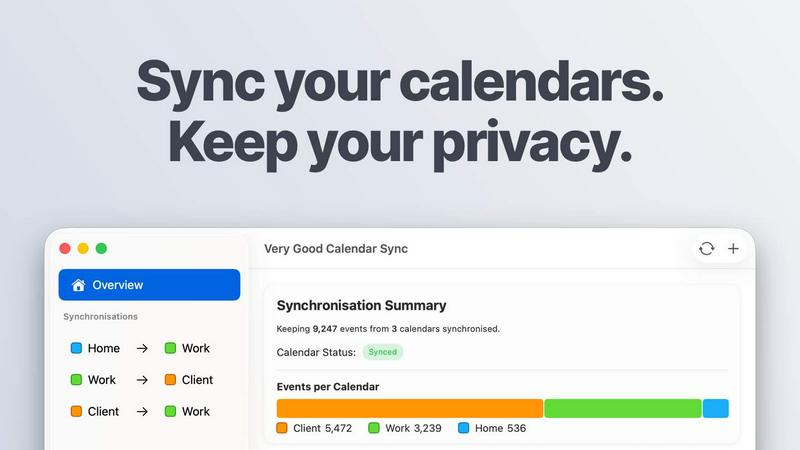
About Very Good Calendar Sync
Very Good Calendar Sync is a privacy-focused macOS application designed to eliminate the chaos of managing multiple calendars across work, personal, and client accounts. The app runs entirely on your Mac and works directly with the native macOS Calendar.app, synchronizing events automatically in the background once you set it up. Unlike cloud-based synchronization services that require linking accounts or granting third-party access to your calendar data, Very Good Calendar Sync keeps everything on your device. Your calendar information never leaves your Mac, no credentials are shared, and no external servers store your data. The app is built for consultants managing client calendars, employees balancing work and personal schedules, freelancers juggling multiple projects, and anyone tired of dealing with double-bookings and manual cross-checking. With a simple two-minute setup process, the app monitors your calendars and syncs changes automatically, ensuring your availability is always accurate across all your calendars. You maintain complete control over what gets synchronized, including choosing specific weekdays, setting daily hours, defining a start date, and deciding whether to share full event details or only your busy time. The app supports all calendar providers that work with macOS Calendar.app, including Google Calendar, Microsoft Outlook, Apple iCloud, and any CalDAV account, making it a versatile solution for professionals and teams who need reliable, private calendar synchronization.
Features of Very Good Calendar Sync
Clone or Redact Event Details
Share your availability without sharing your personal life by choosing exactly what information gets synchronized. You can clone events with full details, including title, description, and location, or redact them to show only that you are busy. This feature ensures your private appointments remain confidential while still blocking off time on your other calendars, preventing double-bookings without exposing sensitive information to colleagues or clients.
Stays Out of the Way
The app runs quietly in your menu bar and requires no ongoing attention after initial setup. Once you configure your synchronization preferences, the app automatically monitors your calendars and syncs changes in the background whenever events are added, modified, or deleted. You set it up once and forget about it, eliminating the need for manual calendar management and reducing the cognitive load of keeping multiple schedules aligned.
Filter by Day and Time
Each synchronization gets its own set of rules, giving you granular control over what gets shared between calendars. You can synchronize only weekdays while skipping weekends, set specific daily hours such as 9 AM to 6 PM to limit syncing to work hours, or pick specific days of the week. You can also define a start date for synchronization, ensuring that only future events are shared while keeping past appointments private.
Built into macOS
The app works directly with the native macOS Calendar.app, requiring no extra applications to install or connections to configure. Your calendars are already available in Calendar.app, and the app leverages your existing setup without adding complexity. This integration means you can use all the calendar providers you already have configured, including Google Calendar, Microsoft Outlook and Exchange, Apple iCloud, and any CalDAV account, without any additional setup steps or third-party access.
Use Cases of Very Good Calendar Sync
Consultants Managing Client Calendars
Consultants who work with multiple clients can keep each client calendar synchronized without manually cross-checking availability or risking double-bookings. By setting up individual synchronization rules for each client relationship, consultants can ensure that their availability is accurate across all calendars while maintaining privacy by redacting event details when appropriate. The automatic background synchronization eliminates the need to update multiple calendars manually after each new appointment.
Employees Balancing Work and Personal Schedules
Employees who use separate work and personal calendars can seamlessly manage both schedules without confusion. When a dentist appointment is added to a personal calendar, it automatically appears on the work calendar as busy time, preventing colleagues from scheduling meetings during that period. This synchronization ensures that teams see real-time availability while keeping personal event details private, reducing the risk of double-bookings and missed commitments.
Freelancers Juggling Multiple Projects
Freelancers who maintain separate calendars for different projects or clients can synchronize them to maintain a unified view of their availability. Each synchronization can have its own filtering rules, allowing freelancers to share only workday hours with clients while keeping evenings and weekends free for personal time. The redaction feature ensures that client-specific event details remain confidential while still blocking off time on other project calendars.
Agencies and Cross-Functional Teams
Agencies balancing internal team calendars with client-facing schedules can eliminate confusion by synchronizing all calendars to show the same real-time availability. Team members can see when colleagues are busy without needing access to the details of those events, improving coordination across departments and reducing scheduling conflicts. The app supports unlimited synchronizations in paid plans, making it scalable for teams with complex calendar structures.
Frequently Asked Questions
Do you store any of my calendar data?
No. Very Good Calendar Sync runs entirely on your Mac and never transmits your calendar data to any external servers. The app uses your Mac's native calendar access through macOS Calendar.app and does not collect, store, or analyze any of your calendar information. There are no servers of our own, no data collection systems, and no analytics tracking your calendar activity. Your data stays on your device, and only your Mac talks directly to your calendar accounts.
Which calendar providers are supported?
Any calendar provider that works with macOS Calendar.app is supported. This includes Google Calendar, Microsoft Outlook and Exchange, Apple iCloud, and any CalDAV account. If it shows up in your native macOS Calendar.app, it works with Very Good Calendar Sync. There is no extra setup required, and you do not need to grant third-party access to your accounts. Your Google, Microsoft, and Apple credentials remain safely stored under macOS' Internet Accounts system.
Does it sync when my Mac is off or asleep?
No, synchronization only occurs when your Mac is awake and running. The app monitors your calendars and syncs changes in the background while your Mac is active. When your Mac goes to sleep or is turned off, synchronization pauses and resumes automatically when the device wakes up or restarts. This ensures that your calendars are always up to date when you are using your Mac without requiring the device to remain powered on continuously.
Is this app available for Windows or iOS?
No, Very Good Calendar Sync is currently available only for macOS. The app is built directly into the macOS ecosystem and works natively with the macOS Calendar.app. There are no versions for Windows or iOS at this time. The app is designed specifically for Mac users who want to keep their calendars synchronized without relying on cloud-based services or third-party servers.
Pricing of Very Good Calendar Sync
Very Good Calendar Sync offers three pricing tiers to accommodate different needs. One synchronization between two calendars is completely free with no payment required. For users who need more synchronizations, the monthly plan costs £1.99 per month with flexible month-to-month billing and the ability to cancel anytime. The annual plan is priced at £19.99 per year, saving over 15 percent compared to the monthly plan. The lifetime plan costs £39.99 as a one-time payment and includes all future updates. All paid plans include unlimited synchronizations, support for all calendar providers, and email support. Each license is per-user and covers all of your Macs. You can download the app for free and choose your plan within the application.
Explore more in this category:
Similar to Very Good Calendar Sync
Product Launch Checklist
A free launch checklist for SaaS, apps, AI tools and more. Every step says why it matters and when you can skip it.
Kody Tools
Free collection of online developer utilities, code formatters, and digital converters designed to streamline your daily workflow.
Forms Plugin
The #1 Native Form Builder Plugin for Framer - No Code, No Embeds, No External Platforms.
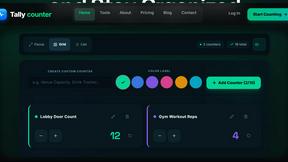
tallycounterweb.com
Online tally counter for tracking attendance, workouts, inventory, visitors, sports scores, habits, and everyday counting tasks.


iHatePosting
Create once, tailor for each platform, and schedule posts across 14 social networks from one simple dashboard.
PDFWix
PDFWix is a free online PDF toolkit designed to make everyday PDF tasks simple, fast, and private.
PDFKing
Free online PDF tools to merge, compress, convert, edit, sign, and manage documents—no signup, watermarks, or daily limits.