
Cece AI
Cece AI is an executive assistant for small businesses that handles email, scheduling, quotes, and invoices to save you time and money.
Visit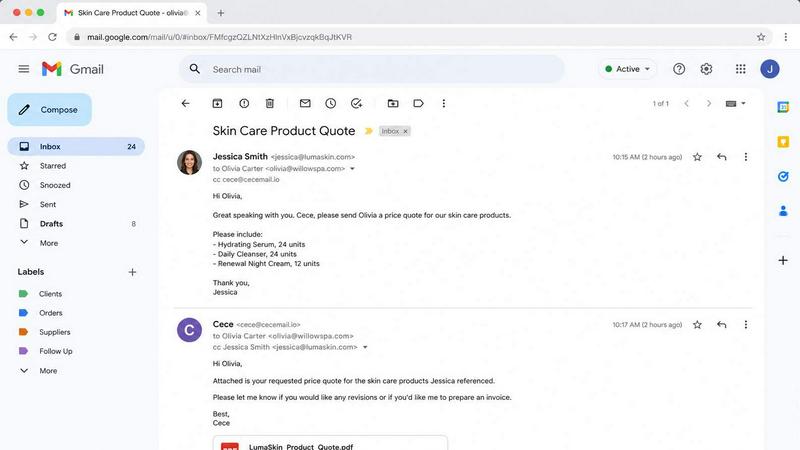
About Cece AI
Cece AI is a practical artificial intelligence executive assistant designed specifically for small business owners and independent professionals who are overwhelmed by daily administrative tasks. Unlike generic chatbots or complex software platforms that require constant monitoring and babysitting, Cece AI operates directly within the email inbox, the place where business owners already spend the majority of their time. The core functionality revolves around a simple workflow: users CC the Cece AI email address ([email protected]) on any email thread, and the AI assistant takes over. It can schedule meetings by checking calendar availability and coordinating with participants, generate professional quotes and invoices with custom branding and pricing, respond to customer inquiries using pre-configured business information, send follow-up reminders, and track outstanding tasks. Setup is straightforward through the Cece dashboard, where users configure their business profile, price book, services offered, and communication preferences. Once configured, Cece AI identifies users by their sender domain and applies the correct business configuration automatically. The primary value proposition is reducing administrative burden without the cost of hiring additional staff, which typically runs over $3,000 per month. Cece AI starts at $88 per month with a 14-day free trial, making it an accessible solution for businesses that need reliable, automated administrative support without the overhead of a full-time employee. Industries served include trades like plumbing, electrical, and HVAC, as well as professional services such as law firms, insurance agencies, accounting practices, property management, med spas, salons, consulting firms, and real estate agencies.
Features of Cece AI
Email-Based Task Execution
Cece AI operates entirely through email, allowing users to delegate tasks by simply CCing the assistant on any thread. When CCed, Cece reads the entire email conversation, understands the context, checks the user’s business configuration including services, pricing, and frequently asked questions, and then determines the appropriate action. This could involve sending a professional reply, scheduling a meeting, generating a document, or initiating a follow-up sequence. The entire workflow happens within the inbox, eliminating the need to switch between multiple applications or learn new interfaces.
Automated Meeting Scheduling
When Cece AI detects a scheduling request in an email thread, it automatically checks the user’s integrated calendar for availability, coordinates timing with all participants, and sends calendar invites complete with meeting links such as Google Meet. The assistant handles the entire scheduling process, including sending confirmations and reminders, without the user needing to manually check times or send separate calendar invitations. This feature is particularly valuable for professionals who receive multiple meeting requests daily and want to eliminate the back-and-forth of scheduling.
Document and Quote Generation
Cece AI can create professional PDF documents including quotes, invoices, and proposals directly from email requests. When a customer asks for pricing, the assistant accesses the user’s configured price book, applies the correct pricing structure, generates a branded PDF with the user’s company details, terms, and payment information, and sends it directly to the customer. The assistant also tracks document validity periods and can follow up if documents expire without action. This feature ensures consistent, professional document output without manual formatting or template management.
Intelligent Follow-Up and Reminder Management
Cece AI automatically tracks the status of all ongoing conversations and tasks. If a sent quote has not received a response after a specified period, the assistant sends a friendly follow-up nudge. If an invoice remains unpaid, Cece can send reminders. The assistant also manages reminders for the user, such as checking in on a lead or following up on a project milestone. Users can instruct Cece to perform actions on specific dates or after certain intervals, effectively turning the email inbox into a proactive task management system.
Use Cases of Cece AI
Managing Customer Inquiries and Quoting for Trades
A plumbing or HVAC business receives daily emails requesting quotes for repairs or installations. By CCing Cece AI on each inquiry, the assistant automatically accesses the business’s price book, generates a professional quote with the correct pricing for the specific service, includes company terms and payment information, and sends the PDF directly to the customer. Cece also tracks the quote’s validity period and sends follow-up reminders if the customer has not responded. This eliminates the need for the business owner to manually create and send each quote, saving hours per week.
Automating Meeting Scheduling for Consultants
A consultant who frequently receives requests for introductory calls or discovery meetings can delegate all scheduling to Cece AI. When a potential client emails about setting up a call, the consultant simply replies and CCs Cece. The assistant checks the consultant’s calendar, finds mutually available times, coordinates with the client, and sends a calendar invite with a video conferencing link. The entire process happens without the consultant ever needing to check their availability or send separate scheduling links, freeing them to focus on billable work.
Streamlining Invoice and Payment Follow-Ups for Freelancers
A freelance graphic designer or web developer sends invoices after completing projects but often struggles with late payments. By using Cece AI, the designer can have the assistant send invoices automatically upon project completion. Cece then tracks payment status and sends polite follow-up reminders at configured intervals, such as 7 days and 14 days after the due date. The assistant can also escalate the reminder tone if necessary, ensuring consistent follow-through without the designer having to manually track each invoice’s status.
Handling Routine Customer Service Responses for Property Managers
Property managers receive hundreds of emails daily from tenants about maintenance requests, lease inquiries, and general questions. Cece AI can be configured with a knowledge base of frequently asked questions and standard responses. When a tenant emails about a routine issue, the assistant can draft and send an appropriate response based on the configured information, such as directing the tenant to the maintenance portal or providing information about lease renewal procedures. This allows the property manager to focus on complex issues while Cece handles the routine, repetitive inquiries.
Frequently Asked Questions
How does Cece AI identify me and apply my business settings?
Cece AI identifies users by their sender domain. When you email [email protected] from your business email address, the assistant recognizes your domain and automatically applies the business configuration you set up in the Cece dashboard. This includes your services, pricing, company details, communication preferences, and calendar integration. You can configure multiple settings for different business lines or departments, and Cece will apply the correct configuration based on the email address you are sending from.
What happens if Cece AI cannot handle a request or misunderstands the context?
If Cece AI is unable to determine the appropriate action or if the request falls outside its configured capabilities, the assistant will notify you via email and explain what it could not process. You can then provide clarification or handle the request manually. Cece AI is designed to learn from these interactions and improve over time. The assistant also provides clear confirmations for actions it takes, such as confirming that a meeting was scheduled or a quote was sent, so you always know what has been done.
Is my business data secure when using Cece AI through email?
Cece AI prioritizes data security and privacy. The assistant only accesses the email threads you explicitly CC it on, and it processes information based on your configured business settings. Data is encrypted in transit and at rest. Cece AI does not share your business information with third parties, and all processing is done within secure environments. You maintain full control over what information the assistant can access and what actions it can take on your behalf.
Can Cece AI work with multiple email accounts or team members?
Yes, Cece AI can be configured to work with multiple email accounts and team members within the same business. Each user can have their own Cece dashboard with personalized settings, or you can create shared configurations for team-wide use. The assistant identifies users by their individual sender domains, so each team member’s interactions are handled separately. This makes Cece AI suitable for small businesses with multiple employees who all need administrative support.
Pricing of Cece AI
Cece AI offers a straightforward pricing model designed for small businesses. The service starts at $88 per month, with payment details collected at checkout. A 14-day free trial is available, allowing users to test the assistant with their actual email workflows before committing to a paid subscription. There are no hidden fees or long-term contracts, and users can cancel at any time. The pricing is significantly lower than the cost of hiring a full-time administrative assistant or virtual assistant, which typically starts at $3,000 per month. This makes Cece AI an accessible and cost-effective solution for businesses that want professional administrative support without the overhead of additional staff.
Similar to Cece AI

Product Launch Checklist
A free launch checklist for SaaS, apps, AI tools and more. Every step says why it matters and when you can skip it.
Kody Tools
Free collection of online developer utilities, code formatters, and digital converters designed to streamline your daily workflow.

Forms Plugin
The #1 Native Form Builder Plugin for Framer - No Code, No Embeds, No External Platforms.
tallycounterweb.com
Online tally counter for tracking attendance, workouts, inventory, visitors, sports scores, habits, and everyday counting tasks.


iHatePosting
Create once, tailor for each platform, and schedule posts across 14 social networks from one simple dashboard.
PDFWix
PDFWix is a free online PDF toolkit designed to make everyday PDF tasks simple, fast, and private.
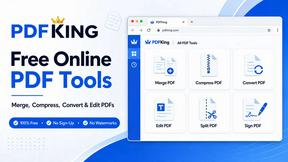
PDFKing
Free online PDF tools to merge, compress, convert, edit, sign, and manage documents—no signup, watermarks, or daily limits.