

Alternatives to Cece AI
Cece AI is an executive assistant for small businesses that handles email, scheduling, quotes, and invoices to save you time and money.
Explore 20 alternatives to Cece AI. Compare features, pricing, and find the best fit for your needs.

My Tools Suite Pro
Discover the best free online tools with ToolSuite Pro. Explore AI, productivity, marketing, SEO, writing, business, and software tools in one place.


GigUp
GigUp helps freelancers discover relevant Upwork jobs through AI matching, automated monitoring, and instant alerts.

Bolts
AI employees with a brain that think, remember your business and work 24/7 on their own cloud computers.
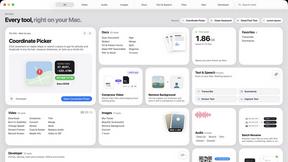
Toolbox
96 private Mac tools in one app: compress video, sign PDFs, remove backgrounds, transcribe. Offline, no account, pay once.

Safe Outreach
AI-powered platform that evaluates the safety of LinkedIn automation tools and helps reduce the risk of account restrictions.

ConnectMachine
Still handing out paper business cards? ConnectMachine is a free digital business card that saves straight into the other person's contacts.


Emailyy
Free email tools for signatures, subject lines, HTML previews, word counts, and email headers. Browser-based, simple to use, and no signup required.

Uniclip
Clip pages, take full-page screenshots and batch-capture list data to Notion, Feishu, Obsidian, Markdown, CSV or JSON.

TroveKey
Search tabs, Chrome bookmarks and history, run browser commands, and save webpages and social posts locally—no account.

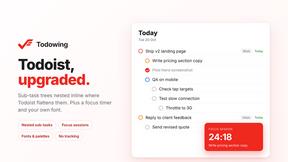
Todowing
Chrome extension for Todoist that nests sub-tasks inline in Today, Upcoming, Filter and Label views. Free, with a $19.99 one-time unlock.

LightScreen
Free light screen tool online. Turn any display into a flashlight, ambient light, or solid-color screen. No download or sign-up.

FreeVideoGenerator
Free AI video generator: turn text prompts and photos into video clips with Sora 2, Veo 3.1, Wan and more. Free starter credits, no watermark download


Noter AI
AI meeting notes, transcripts, summaries and action items on iPhone, iPad and Android.
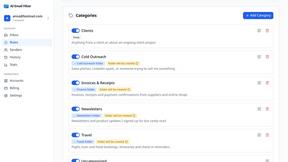
AI Email Filter
AI Email Filter sorts incoming mail into folders using plain-language prompts you write. Works with any IMAP mailbox; bring your own LLM if you want.

About Cece AI Alternatives
Cece AI is an AI-powered executive assistant that operates directly through email, designed to help small business owners and entrepreneurs manage administrative tasks without adding overhead. It falls into the productivity and management category, functioning as a virtual assistant that handles scheduling, customer communication, quoting, invoicing, and follow-ups from within the user’s existing inbox. Users typically seek alternatives to Cece AI for reasons such as pricing structure, the need for more advanced integrations, or a desire for a different platform experience, such as mobile-first apps or team collaboration features. Others may find that their specific industry requires specialized workflows or compliance features that a generalist AI assistant cannot fully address. When evaluating alternatives to Cece AI, it is important to consider how the tool aligns with your existing workflow, especially if your business relies heavily on email communication. Look for solutions that offer similar task automation capabilities, such as scheduling, reminders, and document generation, but also evaluate the ease of setup, integration with your calendar and CRM, and the level of customization available. Pricing transparency and scalability are also critical, as some tools may charge per user or per task, while others offer flat monthly fees. Finally, consider the quality of customer support and whether the alternative provides a dashboard or interface that you find intuitive and efficient for daily use.
FAQs about Cece AI Alternatives
What is Cece AI?
Cece AI is an AI executive assistant that operates directly through email to help business owners manage administrative tasks. It allows users to set up their calendar, business profile, price book, and preferences in a dashboard, then execute daily tasks by simply CCing Cece on an email. The tool handles scheduling, customer responses, quoting, invoicing, follow-ups, reminders, and more, turning messy email threads into completed tasks.
Who is Cece AI for?
Cece AI is built for small business owners and entrepreneurs who are overwhelmed by email, admin work, and incomplete follow-ups. It is designed for those who want to reduce the need for a full-time hire by automating customer communication and task management directly from their inbox. The tool is practical for anyone who already conducts most of their business via email and needs a reliable assistant without adding another employee.
Is Cece AI free?
The provided content does not specify whether Cece AI offers a free tier, but it is positioned as a paid productivity tool for small businesses. Users typically need to set up a dashboard with their business profile and pricing information, which suggests a subscription or usage-based pricing model. For specific pricing details, including any free trials or plans, you should visit the official Cece AI website.
What are the main features of Cece AI?
Cece AI offers a range of features including scheduling meetings, responding to customers, creating quotes, sending invoices, tracking follow-ups, and managing reminders. All of these tasks are executed by CCing Cece on an email, allowing users to stay within their inbox. The tool also helps keep work moving by turning messy email threads into completed tasks, faster responses, and fewer dropped balls.