
Formly
Formly lets you create, publish, and analyze forms by chatting with AI or using a visual editor, turning goals into answers.
Visit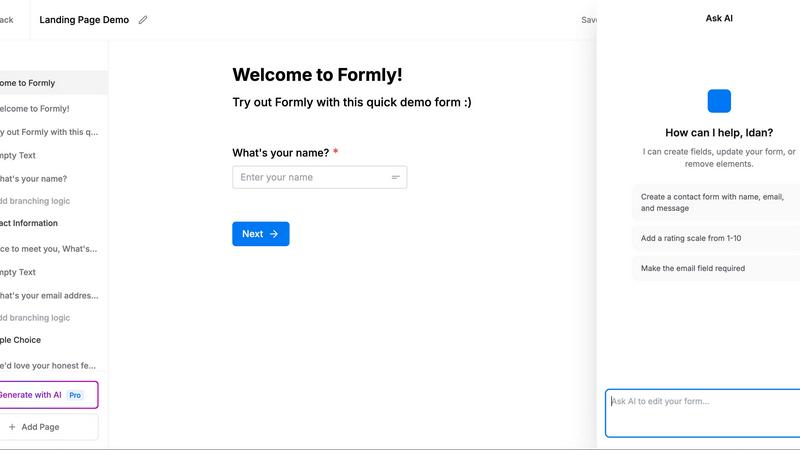
About Formly
Formly is a modern form-building platform that reimagines how teams create, publish, and analyze forms by integrating directly with AI agents like Claude, ChatGPT, Cursor, Codex, and OpenClaw. Instead of starting from a blank page or wrestling with rigid templates, users describe the outcome they want in natural language, and Formly's AI generates a polished, high-converting form in seconds. The platform is designed for product teams, HR professionals, marketers, event organizers, and developers who need to collect qualified leads, screen applicants, gather honest feedback, or manage event signups without friction.
What sets Formly apart is its dual approach: AI handles the heavy lifting of drafting questions, selecting field types, and structuring page flows, while a full-featured visual editor gives users complete control to fine-tune every detail. The editor supports drag-and-drop blocks, multi-page flows, conditional logic, answer piping, file uploads, signatures, ratings, custom branding, and embedded forms. Once published, Formly provides robust analytics, submission management, webhooks, email notifications, and GDPR-conscious hosting in Europe. Submissions can be piped directly into CRMs, databases, or other tools via webhooks or the REST API, ensuring answers go where they are needed most. With unlimited forms and submissions under a single plan, Formly eliminates the complexity of traditional form builders and puts the focus on getting answers, not wrestling with forms.
Features of Formly
AI-Powered Form Generation from Chat
Formly connects to your preferred AI agent in a one-time setup, then lets you create forms entirely through natural language conversation. You simply describe the outcome you want, such as "I need to screen 200 job applicants" or "Create a feedback survey for our beta users," and the AI generates a complete form with relevant questions, appropriate field types, and a logical page flow. The generated form appears in the visual editor within seconds, ready for review and refinement. This feature dramatically reduces the time from idea to published form, making it ideal for teams that need to move quickly without sacrificing quality.
Full Visual Editor with Drag-and-Drop Blocks
Every AI-generated form opens in a comprehensive visual editor that provides complete control over the final product. Users can drag and drop a wide variety of block types, including text inputs, dropdowns, matrices, phone fields, email fields, signatures, ratings, file uploads, and more. The editor supports real-time preview, multi-page flows, and custom branding, allowing teams to match their organization's visual identity. Whether you need to fine-tune a question's wording, adjust the layout, or add entirely new sections, the editor gives you the flexibility to go far beyond what the AI initially built.
Conditional Logic and Answer Piping
Formly enables personalized form experiences through conditional logic and answer piping. Conditional logic allows you to show or hide specific questions and sections based on previous answers, ensuring each respondent only sees relevant content. Answer piping lets you dynamically insert a respondent's earlier answers into later questions, creating a conversational flow that feels tailored to each individual. For example, you can greet users by name, reference their previous selections, or branch to entirely different pages based on their responses. These features improve completion rates and data quality by reducing friction and keeping respondents engaged.
Multi-Page Forms and Smart Flow Management
Long surveys, detailed applications, and complex feedback forms benefit from Formly's multi-page capabilities. Users can split forms into focused steps, each with its own set of questions and logic, making the experience less overwhelming for respondents. The visual editor allows you to create new pages, reorder them, and apply conditional logic across pages. This structure is particularly effective for job applications, event registrations, and in-depth customer research, where breaking a form into digestible sections significantly increases completion rates. Combined with progress indicators and personalized paths, multi-page forms ensure respondents finish what they start.
Use Cases of Formly
Job Application Screening and Resume Collection
HR teams and hiring managers can use Formly to create comprehensive job application forms that include resume uploads, cover letters, skills assessments, and rating scales. By describing the role and screening criteria to the AI, the platform generates a tailored application flow with appropriate questions and file upload fields. Conditional logic can route applicants to different follow-up questions based on their experience level or desired position. Submissions are immediately available for review, and webhooks can push applicant data directly into an ATS or CRM, streamlining the entire recruitment pipeline from application to interview scheduling.
Customer Feedback and Product Research
Product teams can deploy Formly to gather structured feedback from beta users, customers, or survey respondents. The AI can generate Net Promoter Score (NPS) surveys, feature request forms, or usability questionnaires based on a simple description of the research goal. Multi-page flows allow for deeper probing after initial screening questions, while answer piping personalizes follow-ups based on previous responses. Analytics dashboards show response counts, average ratings, and completion rates, and the AI agent can summarize open-ended feedback directly in chat, highlighting common themes like "dark mode" or "CSV export" that emerge from the data.
Lead Generation and Qualification
Marketing and sales teams can create high-converting lead capture forms that qualify prospects before they reach the CRM. Formly's conditional logic can show different questions based on company size, budget, or interest level, ensuring only relevant leads are passed to sales. Custom branding and embed capabilities allow forms to appear seamlessly on landing pages, in popups, or behind short links. Webhook integrations push qualified leads directly into CRM systems like Salesforce or HubSpot in real time, eliminating manual data entry and accelerating response times. Analytics provide insights into conversion rates and drop-off points for continuous optimization.
Event Registration and Signups
Event organizers can build multi-page registration forms that collect attendee details, session preferences, dietary restrictions, and payment information. File upload fields allow for headshots or presentation materials, while signatures can capture waivers or agreements. Conditional logic can show different pricing tiers or add-on options based on earlier selections. Formly's embed feature lets organizers place the form directly on their event website, and email notifications keep both organizers and attendees informed about confirmations and updates. Post-event feedback forms can be generated instantly using the same AI workflow, creating a seamless end-to-end event management experience.
Frequently Asked Questions
How do I connect Formly to my AI agent?
Connecting Formly to your AI agent is a one-time setup process that takes about two minutes. You simply link your preferred agent, such as Claude, ChatGPT, Cursor, Codex, or OpenClaw, through the platform's integration settings. Once connected, you can create, publish, and analyze forms entirely through natural language conversations with that agent. The agent handles the form generation, and you can review and refine the result in the visual editor before publishing.
Can I customize the look and feel of my forms?
Yes, Formly provides extensive customization options for branding and design. The visual editor allows you to apply your organization's colors, logos, fonts, and overall styling to every form you create. You can also embed forms directly into your website, display them in popups, share them via short links, or host them on your own custom domain. This ensures your forms maintain a consistent brand experience across all touchpoints.
Where is my form data stored, and is it secure?
Formly hosts all form data in Europe and is fully GDPR compliant. The platform does not use cookies or track your form responses, ensuring respondent privacy is maintained. Data is encrypted both in transit and at rest, and you have full control over data retention and deletion. For organizations with additional compliance requirements, Formly supports webhooks that can pipe submissions directly into your own secure infrastructure or database.
What happens to form submissions after they are collected?
Every form submission is recorded in Formly's analytics dashboard, where you can view response counts, completion rates, and individual answers. You can also set up email notifications to receive alerts for new submissions. For deeper integration, Formly provides webhooks that push each submission to any service that accepts webhooks in real time, as well as a REST API for pulling responses programmatically. Your AI agent can also summarize submissions and answer questions about the data directly in chat.
Similar to Formly

Egmatic
Egmatic is a no-code editor for 2D games that takes a project from first scene to published build, with no backend work.
Forms Plugin
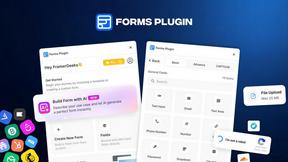
The #1 Native Form Builder Plugin for Framer - No Code, No Embeds, No External Platforms.
Mobile Data & eSIM Calculator
Calculate how much mobile data you need for your trip. Compare eSIM providers and local SIM cards across 146 countries i.
No Code Website Builder
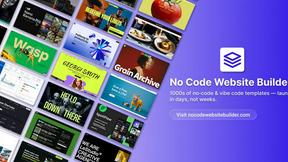
Effortlessly create stunning websites and apps with our vetted no-code templates, launching your project in days without any coding skills.