
Online Keyboard Shortcuts
OnlineShortcuts.com provides a comprehensive, searchable reference for essential Windows, macOS, and Linux keyboard shortcuts.
Visit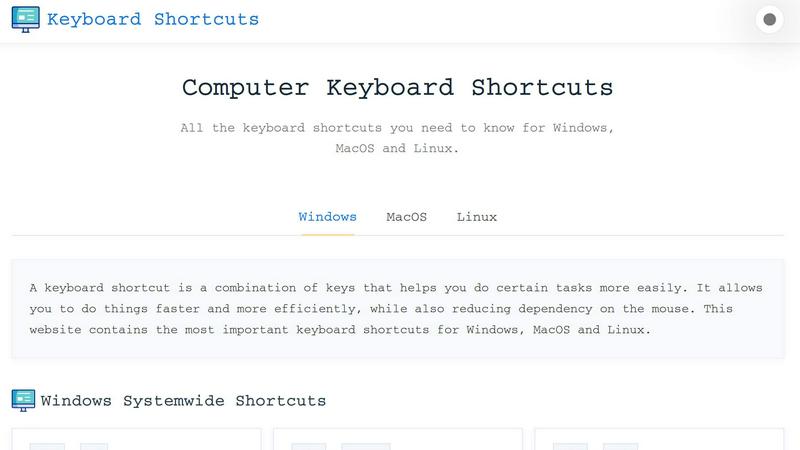
About Online Keyboard Shortcuts
Online Keyboard Shortcuts, available at OnlineShortcuts.com, is a comprehensive, free, and ad-free reference guide designed to help users of all skill levels master keyboard shortcuts across the three major operating systems: Windows, macOS, and Linux. The core purpose of this tool is to eliminate the inefficiency of relying solely on a mouse or trackpad for common computing tasks. By memorizing and applying these key combinations, users can navigate their operating systems, manage files, edit text, control virtual desktops, and browse the web with significantly greater speed and fluidity. The product is structured as a clean, organized website that categorizes shortcuts into logical groups, such as system-wide commands, operating system-specific keys like the Windows Key, and application-specific shortcuts for tools like Command Prompt, File Explorer, and web browsers. This clear categorization makes it easy for users to find exactly what they need without wading through irrelevant information. The primary value proposition is productivity enhancement; by reducing the physical motion of moving a hand to a mouse and navigating through menus, users can execute complex commands in a fraction of a second. Furthermore, the website offers downloadable cheat sheets in PDF and PNG formats, allowing users to keep a physical or digital reference handy. Whether you are a seasoned developer, a graphic designer, a data analyst, or a casual home user looking to speed up your daily workflow, Online Keyboard Shortcuts provides a centralized, reliable, and easy-to-navigate repository of the most important hotkeys. The site is designed to be fully responsive, ensuring that the same comprehensive list is accessible on mobile devices, tablets, and desktop computers, making it a versatile tool for learning and reference on the go.
Features of Online Keyboard Shortcuts
Comprehensive Cross-Platform Coverage
This feature provides a single, unified database of the most essential keyboard shortcuts for Windows, macOS, and Linux operating systems. Instead of searching through multiple help forums or operating system manuals, users can find all the critical commands in one place. The shortcuts are organized by operating system, with further breakdowns into system-wide shortcuts and application-specific ones, ensuring that whether you are using a Windows PC, a MacBook, or a Linux distribution, you have immediate access to the relevant hotkeys to boost your efficiency.
Organized and Categorized Layout
The website presents shortcuts in a highly structured format, grouping them by function and context. Users will find distinct sections for system-wide commands like Alt + Tab, Windows Key shortcuts such as Win + E to open File Explorer, and application-specific commands for tools like Command Prompt and web browsers. This logical organization eliminates the frustration of searching through a long, unorganized list. It allows users to quickly navigate to the category relevant to their current task, such as "Text Editing" or "Virtual Desktop," making the learning process intuitive and efficient.
Downloadable Cheat Sheets
To facilitate learning and offline reference, Online Keyboard Shortcuts offers downloadable versions of its shortcut lists. Users can download a comprehensive PDF file for easy printing or digital storage. Additionally, the site provides PNG image files in both dark and light themes, allowing users to set a wallpaper or save an image to their phone for quick glances. This feature is particularly valuable for users who prefer a physical reference card on their desk or want to share a visual guide with colleagues or students, reinforcing muscle memory through constant visual exposure.
Responsive and Accessible Design
The website is built to be fully responsive, meaning it adapts seamlessly to any screen size, from desktop monitors to smartphones and tablets. This ensures that users can access the shortcut database regardless of the device they are using. The clean, ad-free interface prioritizes readability and ease of navigation, removing distractions so users can focus on learning. This accessibility is crucial for on-the-go learning, allowing a user to quickly check a shortcut on their phone while working on a different computer or to study a list during a commute.
Use Cases of Online Keyboard Shortcuts
Boosting Daily Productivity for Office Workers
Office professionals who spend hours in applications like word processors, spreadsheets, and email clients can dramatically reduce their task completion time. Instead of using a mouse to navigate ribbons and menus, users can learn shortcuts like Ctrl + C/V for copy/paste, Ctrl + Z/Y for undo/redo, and Win + D to show the desktop. By mastering these commands, a worker can maintain a continuous flow of work without breaking hand position, leading to less fatigue and a significant cumulative time saving over a workday.
Streamlining Software Development and IT Administration
Developers and system administrators frequently work in command-line interfaces, code editors, and system management tools. Shortcuts like Ctrl + Shift + Esc to open Task Manager, Win + X to access the Power User menu, and F7 to view command history in Command Prompt are invaluable. These shortcuts allow IT professionals to quickly diagnose system issues, manage processes, and navigate files without interrupting their coding or troubleshooting flow, enabling faster problem resolution and more efficient system management.
Enhancing Creative Workflow for Designers and Editors
Creative professionals using tools like image editors or video editing software benefit from shortcuts that control layers, tools, and panels. While the site focuses on OS-level and common app shortcuts, mastering system-wide commands like Win + Shift + S for a screenshot or Win + G to open the Xbox Game Bar for screen recording is essential. These shortcuts allow designers to capture inspiration, manage multiple project windows, and switch between applications without losing their creative focus or disrupting their mouse grip on a drawing tablet.
Accelerating Learning for New Computer Users
Beginners or users transitioning from one operating system to another (e.g., from Windows to macOS) can use the site as a structured learning tool. The clear categorization and comprehensive lists help new users understand the logic behind operating system navigation. For example, a new user can learn the equivalent of a Windows shortcut on a Mac or discover fundamental commands like Alt + Tab for switching windows. This structured approach accelerates the learning curve, helping new users become proficient and confident in their computing abilities much faster.
Frequently Asked Questions
What is the main purpose of Online Keyboard Shortcuts?
The main purpose of Online Keyboard Shortcuts is to provide a free, central, and easy-to-navigate repository of the most important keyboard shortcuts for Windows, macOS, and Linux. It is designed to help users improve their productivity and efficiency by reducing their reliance on a mouse and memorizing key combinations for common tasks like file management, text editing, and system navigation. The website serves as both a learning resource and a quick reference guide.
How can I download the keyboard shortcuts for offline use?
You can download a comprehensive list of the keyboard shortcuts as a handy PDF file or as a PNG image. The website offers two versions of the PNG download: a dark theme and a light theme. These downloads allow you to print a physical cheat sheet, set the image as your desktop wallpaper or phone background, or keep a digital copy on your device for quick reference when you are not connected to the internet.
Are the keyboard shortcuts on this site accurate for the latest software versions?
The shortcuts provided are curated to be as accurate as possible for the specified software versions at the time of writing. However, software updates from Microsoft, Apple, or Linux distributions can sometimes change specific hotkeys or introduce new ones. The site acknowledges this and recommends that users verify critical shortcuts with the specific version of the operating system or application they are running to ensure complete accuracy.
Is there a way to request new shortcuts or software to be added to the list?
Yes, users are encouraged to request new software or shortcuts to be added. The process is described humorously on the website, but it indicates that the creators are open to expanding the database. While there is no formal submission form mentioned, the site implies that user feedback is considered for future updates to ensure the resource remains comprehensive and relevant to the community's needs.
Explore more in this category:
Similar to Online Keyboard Shortcuts

tallycounterweb.com
Online tally counter for tracking attendance, workouts, inventory, visitors, sports scores, habits, and everyday counting tasks.

iHatePosting
Create once, tailor for each platform, and schedule posts across 14 social networks from one simple dashboard.

PDFWix
PDFWix is a free online PDF toolkit designed to make everyday PDF tasks simple, fast, and private.
PDFKing
Free online PDF tools to merge, compress, convert, edit, sign, and manage documents—no signup, watermarks, or daily limits.



Video2URL
Turn videos, images, PDFs, and files into shareable links with fast uploads and privacy-friendly controls.
