ProcessSpy
ProcessSpy is an advanced process monitor for Mac that provides real-time insights, detailed filtering, and comprehensive process management.
Visit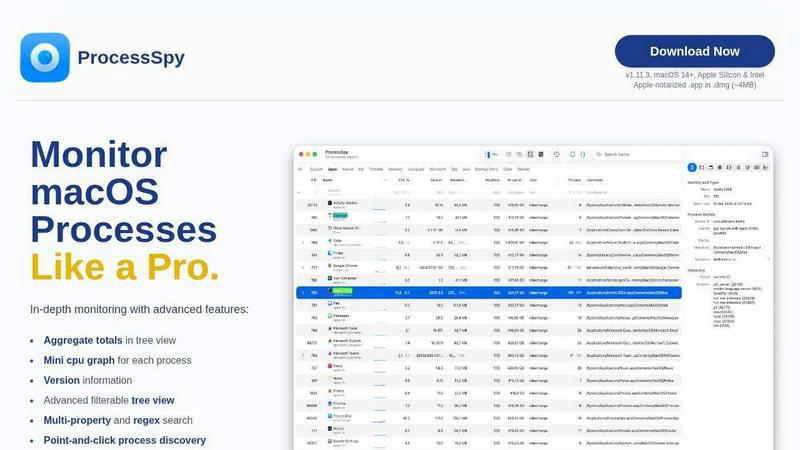
About ProcessSpy
ProcessSpy is an advanced process monitoring tool specifically designed for macOS, functioning as a native alternative to Sysinternals Process Explorer. It empowers users to delve deeper into system processes than the built-in Activity Monitor, revealing details that are otherwise obscured. With the capability to visualize process trees, inspect open files, and view environment variables, ProcessSpy transforms how developers and system administrators interact with applications running on their Mac systems. Its primary value proposition lies in its comprehensive monitoring capabilities, allowing users to manage and troubleshoot processes effectively. Whether you are a developer managing multiple applications or an IT professional ensuring system integrity, ProcessSpy provides a robust suite of tools tailored to enhance your macOS experience.
Features of ProcessSpy
Advanced Tree View
ProcessSpy boasts an advanced tree view that enables users to visualize processes in real time. This feature allows for quick filtering and searching, including JavaScript-based filters, making it easier to track resource utilization across various applications. Aggregate totals for CPU, memory, and threads can also be viewed, providing a clear snapshot of system performance.
JavaScript Filters
With JavaScript filters, users can create complex filtering conditions tailored to specific needs. This feature allows for multi-criteria searches, enabling users to identify processes based on various parameters such as command-line arguments and process names, vastly improving efficiency in process management.
Detailed Process Information
ProcessSpy displays extensive details about each process, including command-line arguments, paths, and version information. This level of detail is crucial for developers who need to distinguish between similar processes and understand their specific configurations, allowing for better debugging and optimization.
Historical Process Recording
The ability to record historical values for CPU, memory, and thread usage is a standout feature of ProcessSpy. This functionality not only provides insights into application performance trends over time but also allows users to export this data to CSV files for further analysis, benefiting developers and system administrators alike.
Use Cases of ProcessSpy
Multi-JDK Management
For developers working with multiple Java applications, ProcessSpy simplifies the identification of processes by displaying full command-line information and version details. This aids in managing different JDK versions, ensuring that the correct environment is used for each application.
Performance Monitoring
System administrators can utilize ProcessSpy to monitor resource usage across applications in real time. By leveraging the aggregate values feature, admins can pinpoint resource-intensive processes, allowing for proactive system management and optimization.
Troubleshooting Stubborn Applications
When applications become unresponsive, ProcessSpy allows users to quickly identify and terminate stubborn processes. Its point-and-click interface simplifies the process of killing applications, saving valuable time during critical troubleshooting scenarios.
Environment Variable Inspection
Developers needing to examine environment variables for running processes can rely on ProcessSpy's advanced features. This capability is particularly useful for debugging issues related to configuration and environment setup, enabling a smoother development workflow.
Frequently Asked Questions
Is ProcessSpy safe to install on my Mac?
Yes, ProcessSpy is Apple-notarized and distributed as a signed .app within a .dmg file. This ensures that it is verified and safe for use on both Intel and Apple Silicon Macs.
Does ProcessSpy support older versions of macOS?
ProcessSpy is specifically designed for macOS 14 and newer versions, ensuring compatibility with the latest features and security enhancements available in macOS.
What is the license model for ProcessSpy?
The license model for ProcessSpy allows use on unlimited devices for a single user. It includes lifetime updates and access to new features, providing excellent value for ongoing use.
How does ProcessSpy compare to Activity Monitor?
ProcessSpy offers several advanced features not present in Activity Monitor, such as detailed command-line information, process history recording, and advanced filters, making it a more powerful tool for users needing in-depth process management capabilities.
Similar to ProcessSpy

Egmatic
Egmatic is a no-code editor for 2D games that takes a project from first scene to published build, with no backend work.

StackLedge
Cut through the AI hype and bot-scraped spam. StackLedge is a human-tested directory of active SaaS, useful AI tools, and custom n8n workflows.

WidgIq
Provide an AI-powered customer support widget for your website

Product Launch Checklist
A free launch checklist for SaaS, apps, AI tools and more. Every step says why it matters and when you can skip it.

Forms Plugin
The #1 Native Form Builder Plugin for Framer - No Code, No Embeds, No External Platforms.

AkraLabs
Where modern software products get discovered, launched, and distributed. Explore verified AI tools, SaaS startups, and developer software.