
retroshelf
Retroshelf automatically logs your retro handheld gaming sessions and lets you discover trends and connect with other players.
Visit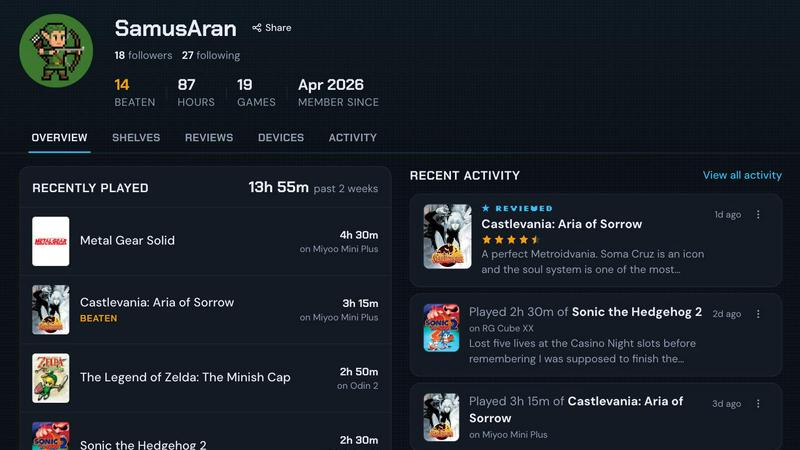
About retroshelf
retroshelf is a specialized play-tracking and discovery application designed exclusively for retro handheld gaming enthusiasts. The platform addresses a common challenge faced by players who own multiple retro handheld devices, such as Miyoo, Anbernic, and Odin models: keeping a coherent record of their gaming sessions across different hardware. Instead of relying on scattered notes, spreadsheets, or memory, retroshelf provides a centralized, public shelf that automatically logs every game session. A tiny plugin installed on the user’s handheld device captures essential session data, including the game title, playtime, and the specific handheld used, without requiring manual input. This data is then organized into a browsable timeline, allowing users to see what they played, when they played it, and on which device. Beyond personal tracking, retroshelf functions as a social discovery platform. Users can browse the shelves of other players to see which games are being picked up, finished, and replayed in real time. Each game entry provides context, such as the device it was played on and the player’s star rating, making recommendations more meaningful. The platform is currently in a closed beta phase, welcoming retro handheld players who want to help shape the community from its early stages. retroshelf is compatible with popular firmware like muOS and OnionOS, ensuring broad accessibility across the retro gaming ecosystem. Ultimately, retroshelf transforms the fragmented experience of playing across multiple handhelds into a unified, reflective, and social gaming journey.
Features of retroshelf
Automatic Session Logging
The core functionality of retroshelf is its ability to log gaming sessions automatically. Users install a small plugin onto their handheld device’s SD card. Once linked to the user’s retroshelf account, this plugin runs silently in the background, capturing every gaming session as it happens. It records the game title, the exact duration of play, and the specific handheld device being used. This eliminates the need for manual tracking, note-taking, or remembering what was played. The data is uploaded seamlessly, ensuring that a user’s shelf updates in real time, even while they are still playing. This feature provides a complete, accurate, and effortless record of a user’s gaming activity across all their retro handhelds.
Public Shelf with Play Context
Every user on retroshelf has a public shelf that serves as a curated portfolio of their gaming history. This shelf is organized into clear categories: currently playing, finished, reviewing, and replaying. Critically, each entry retains its device context, meaning a visitor can see not just that a game was played, but on which specific handheld it was played. This context adds depth to the gaming profile, as different devices offer different experiences for the same game. The public shelf allows users to share their journey with the community, discover new titles through others, and engage in discussions about games played on specific hardware.
Browsable Timeline of Gaming History
retroshelf transforms scattered gaming sessions into a coherent, browsable timeline. Instead of viewing a static list of games, users can scroll through a chronological feed that shows their entire year of play. This timeline makes it easy to reflect on past gaming habits, identify patterns in device usage, and recall specific sessions. Users can look back at what they played on a particular date, see how their tastes have evolved, and track their progress through long games. This feature turns raw play data into a meaningful narrative of a user’s gaming life, making it simple to revisit and share memorable moments.
Community Discovery and Filtering
retroshelf is built as a social discovery platform, not just a personal tracker. Users can browse the shelves of other players to find new games and see what is popular within the retro handheld community. The platform features a “Popular this week” section that highlights which games are currently being picked up, finished, and replayed by the community. Users can also filter shelves by specific devices, such as Miyoo, Anbernic, or Odin, allowing them to see how a game performs on hardware they own or are considering. Reviews are presented with full context, including the handheld used and playtime, providing more actionable insights than a simple star rating.
Use Cases of retroshelf
Managing a Multi-Device Gaming Library
A common challenge for retro handheld enthusiasts is managing their library across multiple devices, such as a Miyoo Mini for portability and an Anbernic RG556 for more demanding titles. retroshelf solves this by automatically logging sessions on each device. The user can see at a glance which games they are playing on each handheld, track total playtime per device, and avoid losing progress or forgetting what they were playing. This centralized log ensures that the user always has a complete picture of their gaming activity, regardless of which device they pick up.
Discovering New Games Through Real Player Shelves
Instead of relying on generic review sites or algorithms, a user can browse the public shelves of other retro handheld players to discover new games. For example, a user interested in role-playing games on the Anbernic RG35XX can filter the community by that device and see what other players are currently enjoying. They can see the game’s title, the player’s star rating, and the context of the handheld used. This provides authentic, peer-driven recommendations that are directly relevant to the user’s hardware and tastes, leading to more satisfying game discoveries.
Reflecting on Personal Gaming Habits Over Time
A user can use the browsable timeline feature to reflect on their gaming habits over the course of a year. They can see which months they played the most, which devices they favored, and how their game preferences shifted. For instance, a user might notice they played more puzzle games on their Miyoo during commutes and more action games on their Odin at home. This data-driven self-reflection helps users understand their own behaviors, make more intentional choices about what to play next, and appreciate the breadth of their gaming journey.
Sharing a Curated Gaming Portfolio with the Community
A retro gaming content creator or active community member can use their public shelf as a living portfolio of their gaming activity. They can link to their shelf in forum signatures or social media bios, allowing followers to see what they are currently playing, have finished, and are reviewing. The device context adds credibility, as followers can see exactly which hardware was used for each game. This builds trust and facilitates deeper discussions about game performance and device capabilities, strengthening the user’s presence within the retro gaming community.
Frequently Asked Questions
How does the automatic session logging work on my handheld?
retroshelf uses a tiny plugin that you install on your handheld device’s SD card. The plugin runs in the background while you play and captures key data for each session, including the game title, the duration of play, and the specific handheld model. This data is then linked to your retroshelf account and uploaded automatically. The process is designed to be hands-off, requiring no manual input from you after the initial setup of dropping the plugin on your SD card and linking your device.
Which handheld devices and firmware are currently supported?
retroshelf currently supports devices running muOS and OnionOS firmware. These are popular custom firmware options for a wide range of retro handhelds, including devices from Miyoo, Anbernic, and others. The platform is actively expanding its compatibility list. Users should check the Plugins section on the retroshelf website for the most up-to-date list of supported devices and firmware versions, as new support is added during the closed beta phase.
Is my shelf automatically public, and can I control its visibility?
Yes, by default, your shelf is public. This is a core feature of retroshelf, designed to foster community discovery and connection. Your shelf displays the games you are playing, have finished, are reviewing, and are replaying, along with the device context. While the platform emphasizes public sharing, you can manage your profile and the information displayed. For specific privacy concerns, refer to the Privacy policy linked in the footer of the retroshelf website for detailed controls and options.
How can I join the retroshelf closed beta?
retroshelf is currently in a closed beta phase, opening in small waves to retro handheld players. To join, visit the retroshelf website and click the “Join beta” button. You will be asked to provide your information to be considered for the next wave of invites. The beta is specifically looking for players who are passionate about retro handhelds and want to help shape the community and features from the beginning. Once accepted, you will receive instructions on how to set up your account and install the plugin on your device.
Explore more in this category:
Similar to retroshelf

PrettyScale
PrettyScale offers nine free AI face analysis tools that run entirely in your browser with no uploads or account needed.

Burge Coffee
Burge Coffee offers free tools and guides for home roasters to track batches, learn the craft, and find small roasters.
On Music AI
On Music AI transforms your text, lyrics, or ideas into complete songs with vocals, beats, and instrumentals using artificial intelligence.

Bloom Plant ID
Bloom Plant ID uses artificial intelligence to instantly identify plants, diagnose diseases, and provide personalized care reminders.
HavenBook
HavenBook offers personalized home maintenance tasks and reminders, helping you protect your investment and prevent costly repairs.
NinjaHackz
NinjaHackz offers portable CS2 cheats like aimbot and wallhack for a seamless, enhanced gaming experience without installation or risks.

True Moments
True Moments animates your still photos with natural AI motion in seconds, letting you relive and share your favorite memories.

It's a Date
It's a Date alerts you the moment NYC restaurant reservations open, ensuring you never miss your perfect dining experience.