RoomCreator
RoomCreator instantly transforms any photo into stunning AI-designed spaces with no skills required.
Visit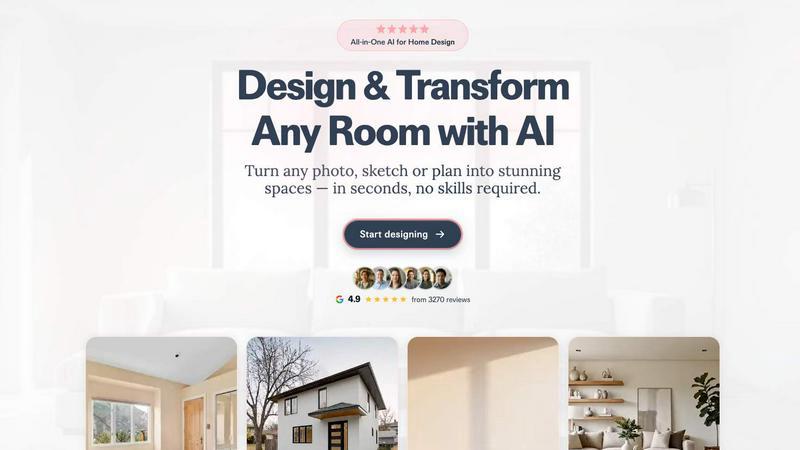
About RoomCreator
RoomCreator is an all-in-one AI-powered home design platform that transforms how individuals visualize and plan their living spaces. It enables users to upload a simple photo of any room—be it a kitchen, bedroom, living room, or exterior—and receive hyper-realistic redesigns in as little as 10 seconds. The core value proposition is democratizing interior and exterior design, making professional-grade visualization accessible to anyone without requiring technical skills, expensive software, or lengthy design cycles. RoomCreator is built for a wide audience, including homeowners planning renovations, real estate agents aiming to enhance property listings, and individual investors evaluating renovation potential. By providing instant, realistic previews of layout changes, new color schemes, furniture arrangements, and complete style makeovers, RoomCreator empowers users to make confident design decisions before committing time or money to physical changes. The platform offers a suite of specialized tools, from instant room redesign to precise brush-based editing and sketch rendering, all designed to offer a fast, easy, and risk-free way to experiment with home design ideas.
Features of RoomCreator
Instant Interior Redesign
This flagship feature allows users to upload a photo of any interior space and instantly generate multiple professionally designed alternatives. The AI analyzes the room's dimensions and features, then applies new styles—such as Modern, Scandinavian, or Japandi—complete with realistic furniture, color palettes, lighting, and decor. It provides a comprehensive before-and-after comparison, enabling users to visualize the full potential of their space with photorealistic accuracy before making any purchases or starting renovations.
Exterior Design Visualizer
Specifically tailored for curb appeal, this tool lets homeowners and real estate professionals test exterior transformations using a single photo. Users can visualize changes to siding materials, paint colors, roofing, landscaping, and architectural details. This instant preview is invaluable for planning repainting projects, renovations, or for creating compelling listing images that showcase a property's potential, all without the need for physical staging or complex 3D modeling software.
Precision Brush Editor
Offering granular control, the Brush Editor (or Inpaint Tool) enables users to make targeted changes without regenerating an entire image. By simply brushing over a specific area—like a piece of furniture, decor, or wall section—users can remove or replace only that element. This feature is perfect for fine-tuning designs, experimenting with individual items, or correcting specific aspects of a generated design, providing flexibility and saving time.
Empty Room Generator & Sketch to Render
This dual-functionality tool serves two key purposes. First, it can instantly declutter any room photo by removing all furniture and objects, leaving a clean canvas of walls, floors, and windows to visualize empty space potential. Second, it can transform hand-drawn sketches, floor plans, or rough layout concepts into fully realized, photorealistic interior images. This bridges the gap between initial idea and visual reality, perfect for early-stage planning and concept development.
Use Cases of RoomCreator
Home Renovation Planning
Homeowners can use RoomCreator to experiment with major redesigns or minor refreshes for any room. By uploading a "before" photo, they can test different wall colors, flooring options, furniture layouts, and overall styles like Coastal or Bohemian. This visual confirmation helps in making confident decisions, aligning family preferences, and avoiding costly mistakes, effectively de-risking the renovation process before hiring contractors or buying materials.
Real Estate Listing Enhancement
Real estate agents and stagers can transform empty, outdated, or cluttered property photos into appealing, staged interiors and exteriors. By generating attractive, modern designs, listings can stand out in competitive markets, attract more potential buyers, and help them visualize the property as their future home. This tool provides high-quality marketing visuals quickly and at a fraction of the cost of professional staging or photography.
Investment Property Analysis
Individual real estate investors and flippers can use RoomCreator to evaluate the renovation potential of a property. By visualizing various upgrade options, they can assess which improvements would add the most value, create compelling "after" images for funding presentations, and accurately plan their renovation budgets and designs. It aids in communicating vision to partners and contractors.
Interior Design Concept Development
DIY enthusiasts, hobbyists, or even professional designers in the early concept phase can leverage the platform to rapidly iterate on ideas. The ability to upload sketches and see them rendered realistically, or to test dozens of themes for a single room, accelerates the creative process. It's an ideal tool for brainstorming, client presentations, and solidifying a design direction with visual aids.
Frequently Asked Questions
How does RoomCreator work?
The process is straightforward and requires no design expertise. First, you upload a photo of your room, which can be a finished space, an empty room, or even a rough sketch. Next, you select a desired design style from a wide range of options like Modern, Scandinavian, or custom themes. Finally, RoomCreator's AI processes your image and generates multiple hyper-realistic "after" previews in about 10 seconds, allowing for instant before-and-after comparisons.
Do I need any design skills to use it?
No, absolutely no design skills are required. RoomCreator is built specifically for homeowners, DIY lovers, and professionals who want to visualize changes without learning complex software. The AI handles all the technical aspects of redesign. You simply provide the photo and choose a style, making the entire process intuitive and accessible for everyone.
What kind of photos can I upload?
You can upload a wide variety of images. The platform accepts photos of existing rooms (even messy or cluttered ones), empty spaces, hand-drawn sketches, floor plans, and exterior shots of your home. While higher-quality photos generally yield more detailed results, the AI is robust enough to work with less-than-perfect or pixelated images, offering great flexibility.
Is there a free trial available?
Yes, RoomCreator offers a free trial to new users. You can start designing immediately with free credits upon signing up, which allows you to test the core features without needing to provide a credit card. This lets you experience the speed and quality of the AI redesigns firsthand before choosing a paid plan that suits your needs.
Similar to RoomCreator

Egmatic
Egmatic is a no-code editor for 2D games that takes a project from first scene to published build, with no backend work.

tallycounterweb.com
Online tally counter for tracking attendance, workouts, inventory, visitors, sports scores, habits, and everyday counting tasks.

PDFKing
Free online PDF tools to merge, compress, convert, edit, sign, and manage documents—no signup, watermarks, or daily limits.


StackLedge
StackLedge is a manually curated discovery engine for founders and developers. We filter out the SEO spam and focus exclusively on high-value tooliing

Video2URL
Turn videos, images, PDFs, and files into shareable links with fast uploads and privacy-friendly controls.