
ytskim
ytskim uses AI to transcribe and summarize YouTube videos, saving you time by extracting key insights from any video.
Visit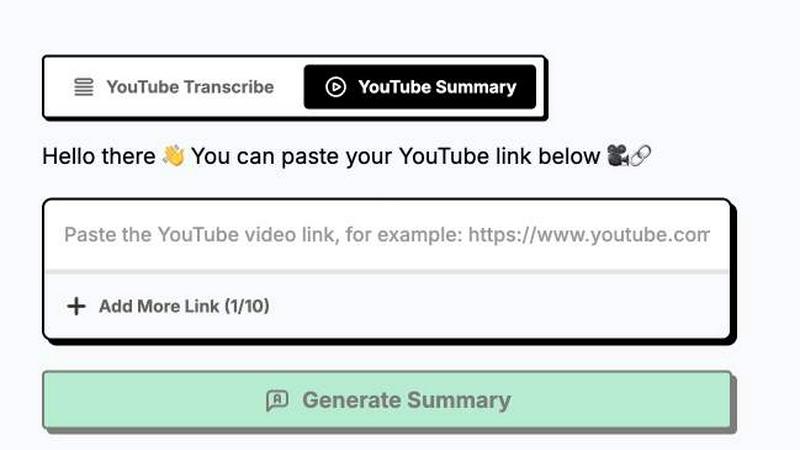
About ytskim
ytskim is a powerful AI-driven tool designed to extract accurate transcripts and generate structured summaries from any YouTube video in seconds. This product addresses the common need for quickly accessing and understanding video content without having to watch the entire footage. By leveraging advanced speech recognition and natural language processing technologies, ytskim converts spoken words into precise, readable text and then distills that text into concise, well-organized summaries. The tool is ideal for students, researchers, content creators, journalists, and professionals who need to capture key information from educational lectures, tutorials, news reports, interviews, and other video sources. Its main value proposition lies in saving users significant time and effort by eliminating the need to manually transcribe or take notes from lengthy videos. With ytskim, users can instantly obtain a complete transcript for reference, citation, or accessibility purposes, and simultaneously receive a structured summary that highlights the most important points, arguments, and conclusions. This dual functionality makes it an indispensable resource for anyone who regularly consumes video content for learning, research, or content production. The product emphasizes accuracy, speed, and ease of use, ensuring that even complex or lengthy videos are processed quickly and reliably. Whether you are a student trying to study from recorded lectures, a content creator repurposing video material, or a professional staying updated with industry talks, ytskim provides a seamless solution for transforming video into actionable text and insights.
Features of ytskim
High-Accuracy Transcription
ytskim utilizes state-of-the-art speech recognition models to convert YouTube video audio into text with exceptional accuracy. It handles various accents, speaking speeds, and background noise levels effectively, ensuring that the resulting transcript is reliable and faithful to the original content. This feature is critical for users who need verbatim text for analysis, citation, or accessibility purposes.
Structured Summary Generation
Beyond simple transcription, ytskim employs advanced natural language processing algorithms to analyze the transcript and produce a structured summary. This summary breaks down the video content into key sections, main points, and supporting details, presented in a clear, hierarchical format. Users can quickly grasp the essence of a video without watching it, making it ideal for review and study.
Rapid Processing Speed
The tool is engineered for speed, delivering transcripts and summaries within seconds of receiving a YouTube video link. This rapid turnaround is achieved through optimized backend processing and efficient API integration, allowing users to move through multiple videos quickly and maintain high productivity.
User-Friendly Interface
ytskim features a clean, intuitive interface that requires no technical expertise. Users simply paste a YouTube video URL, and the tool automatically begins processing. The results are presented in a well-organized layout, with the transcript and summary easily accessible for copying, downloading, or further editing.
Use Cases of ytskim
Academic Research and Study
Students and researchers can use ytskim to quickly obtain transcripts and summaries of educational videos, lectures, and conference presentations. This allows for efficient note-taking, easier review of complex topics, and the ability to cite video sources accurately in academic papers. The structured summary helps in identifying key theories and findings without watching hours of footage.
Content Creation and Repurposing
Content creators, such as bloggers, podcasters, and social media managers, can leverage ytskim to repurpose YouTube video content into written articles, blog posts, or social media captions. The transcript provides the raw material, while the summary offers a quick overview for creating outlines or teasers, saving significant time in content production workflows.
Professional Development and Training
Professionals in fields like technology, marketing, and business can use ytskim to stay updated with industry trends by quickly digesting webinars, tutorials, and keynote speeches. The tool enables them to capture actionable insights and key takeaways without dedicating hours to watching full-length videos, enhancing their learning efficiency.
Accessibility and Inclusivity
ytskim serves as a valuable accessibility tool for individuals who are deaf or hard of hearing, providing accurate transcripts of video content. It also benefits non-native speakers who may find it easier to read a transcript or summary than to follow spoken dialogue, making video content more inclusive and accessible to a wider audience.
Frequently Asked Questions
What types of YouTube videos does ytskim support?
ytskim supports a wide range of YouTube videos, including public videos, unlisted videos, and videos from channels that allow embedding. It works with various content types such as lectures, tutorials, interviews, news reports, and entertainment videos. The tool processes videos in multiple languages, though accuracy may vary depending on the language and audio quality.
How accurate are the transcripts generated by ytskim?
The accuracy of transcripts is generally very high, thanks to advanced speech recognition models. However, accuracy can be affected by factors such as heavy background noise, strong accents, multiple speakers talking over each other, or poor audio quality. ytskim continuously improves its models to handle these challenges, but for critical applications, users are advised to review and edit the transcript as needed.
Can I download the transcript or summary?
Yes, ytskim allows users to download both the transcript and the structured summary in various formats, such as plain text or PDF. This feature is useful for offline access, further editing, or integration into other documents and workflows. The download options are clearly presented in the user interface after processing is complete.
Is there a limit on video length or number of videos I can process?
ytskim may have usage limits depending on the pricing plan or free tier. Typically, there is a maximum video duration for each processing request, and a daily or monthly cap on the number of videos that can be processed. These limits are designed to ensure fair usage and optimal performance for all users. Specific details are available on the product's pricing page.
Similar to ytskim
Todowing
Chrome extension for Todoist that nests sub-tasks inline in Today, Upcoming, Filter and Label views. Free, with a $19.99 one-time unlock.
LightScreen
Free light screen tool online. Turn any display into a flashlight, ambient light, or solid-color screen. No download or sign-up.
FreeVideoGenerator
Free AI video generator: turn text prompts and photos into video clips with Sora 2, Veo 3.1, Wan and more. Free starter credits, no watermark download
Novastart
Apps and files on an infinite canvas where people and AI agents work together.
Noter AI
AI meeting notes, transcripts, summaries and action items on iPhone, iPad and Android.
AI Email Filter
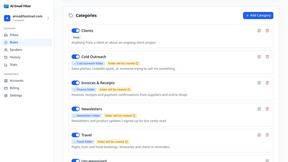
AI Email Filter sorts incoming mail into folders using plain-language prompts you write. Works with any IMAP mailbox; bring your own LLM if you want.
